Overview & Operational Impact
Connecting institutional messaging directly to everyday ERP operations.
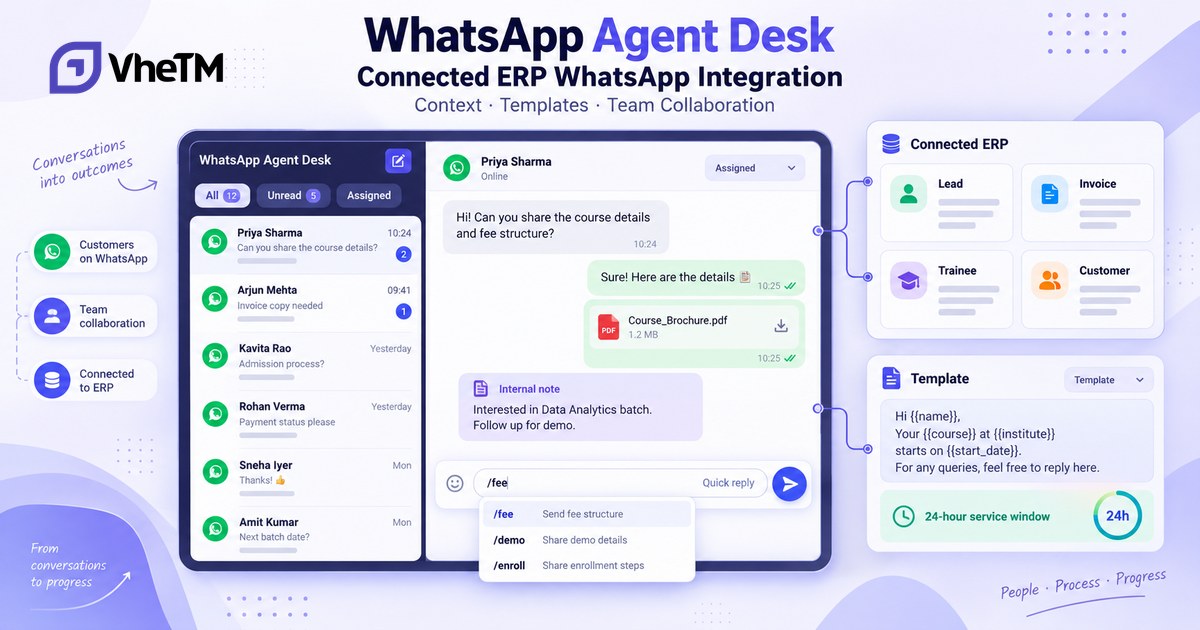
WhatsApp is now part of the connected VheTM communication workflow rather than a separate channel. The Agent Desk helps Sales, Support, Billing, Admissions and Customer Service teams handle conversations with the related ERP record immediately available. Messages, responses, shared documents, ownership and follow-up context can remain associated with the applicable lead, invoice, trainee, customer or other supported business record.
Release At A Glance
What Changed
Key functional enhancements delivered in this release.
Deep ERP Record Linking
Connect a WhatsApp session with CRM Leads, Sales Invoices, Student or Trainee Profiles, Customer or Account records and other supported ERP records.
1-Click Record Messaging
Start from a supported ERP record, select an approved template, populate available ERP variables and continue the resulting conversation in the Agent Desk.
All-in-One Agent Desk
Work from a centralized multi-agent console with incoming and outgoing message visibility, assignment, handover, resolution, closing, unread indicators and customer context.
Quick Replies and / Commands
Type / to search centralized replies such as /greet, /payment or /followup with autocomplete, keyboard navigation and supported placeholders.
Rich Media Handling
Work with supported images, documents, PDFs, audio and other WhatsApp media; preview attachments and adjust captions where supported before sending.
Customer-Service Window Visibility
See the available customer-service window, remaining time and template guidance when an approved template is required.
Internal Team Notes
Keep follow-up details, handover instructions, billing or support notes and status updates inside the conversation without sending them to the customer.
Department Handover
Transfer ownership between teams such as Sales, Support and Billing while preserving the connected customer and ERP context.
ERP-Driven Templates
Use approved template variables for supported values such as customer name, invoice number, outstanding amount, due date, batch and dates.
Operational Communication Workflows
Use approved templates and supported ERP context for batch, attendance and payment communication processes.
Connected Conversation History
Retain messages, documents, agent ownership and follow-up context with the relevant ERP record for future reference.
Feature Highlights in Action
Explore the actual user experience and workflows of the WhatsApp Agent Desk.
Deep Record Linking & Real-Time Context Panel
Never ask a customer to re-explain their situation or hunt for their invoice number. When an agent opens any WhatsApp conversation, the right-hand panel instantly displays the connected ERP record—including CRM lead status, enrolled courses, invoice balances, and contact details fetched directly from core ERP records.
- Automatic matching of incoming WhatsApp numbers against CRM leads and student profiles.
- Direct visibility into lead stage, assigned counselor, course interest, and enrollment history.
- Context remains synchronized across the entire communication lifecycle without tab-switching.
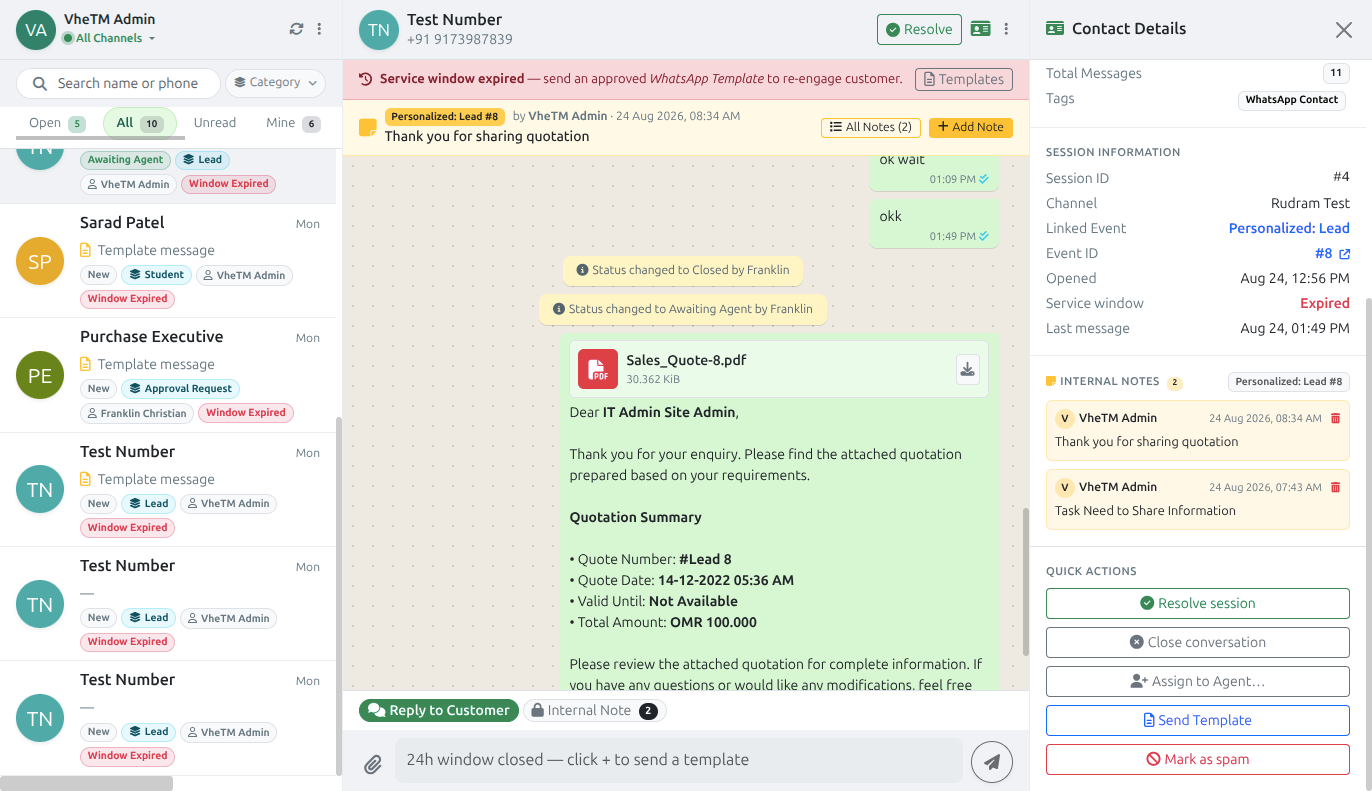
WhatsApp Agent Desk showing real-time CRM lead linking and contextual details panel
Lightning-Fast Productivity with / Quick Replies
Speed up response times while maintaining compliant, brand-consistent communication. Agents simply type "/" in the composer to access a searchable catalog of pre-approved responses organized into intuitive categories, complete with keyboard arrow navigation and autocomplete.
- Searchable commands such as /greet, /payment, and /followup with autocomplete.
- Centralized management ensures all staff use verified answers and up-to-date program information.
- Dynamic placeholders automatically inject {name}, {agent_name}, {company}, {date}, and {time}.
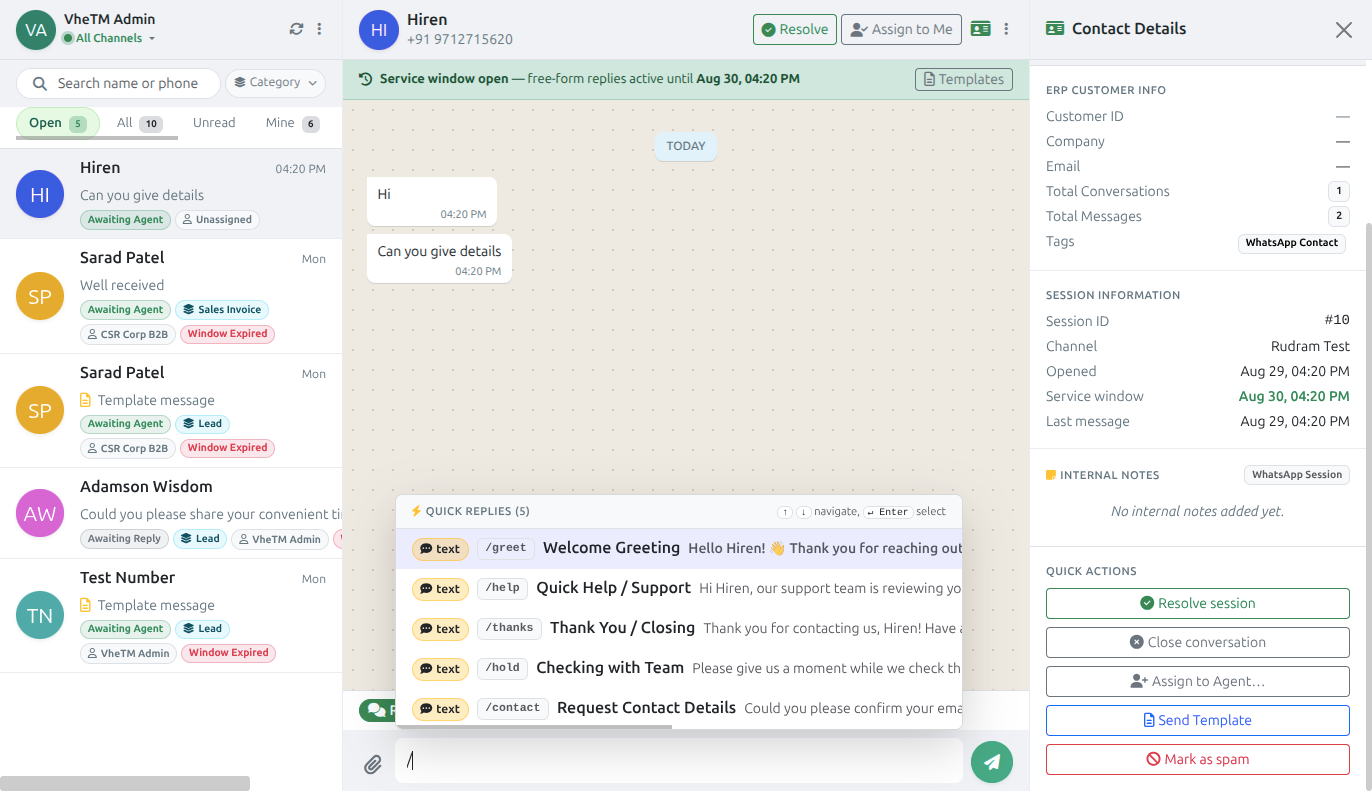
Typing slash to access quick replies with autocomplete and categorization in VheTM Agent Desk
Confidential Internal Notes & Multi-Team Handover
Admissions, academic faculty, and accounts can now coordinate in the exact place where conversations happen. Internal Note mode inserts high-visibility yellow comments into the chat stream for counselor notes, fee arrangements, or handover instructions—completely invisible to the customer.
- Yellow-tinted team notes are strictly internal and are never sent to the customer's WhatsApp.
- Transfer session ownership seamlessly between Sales, Admissions, Support, and Billing teams.
- Assigned agents review full preceding conversation and internal briefing notes before replying.
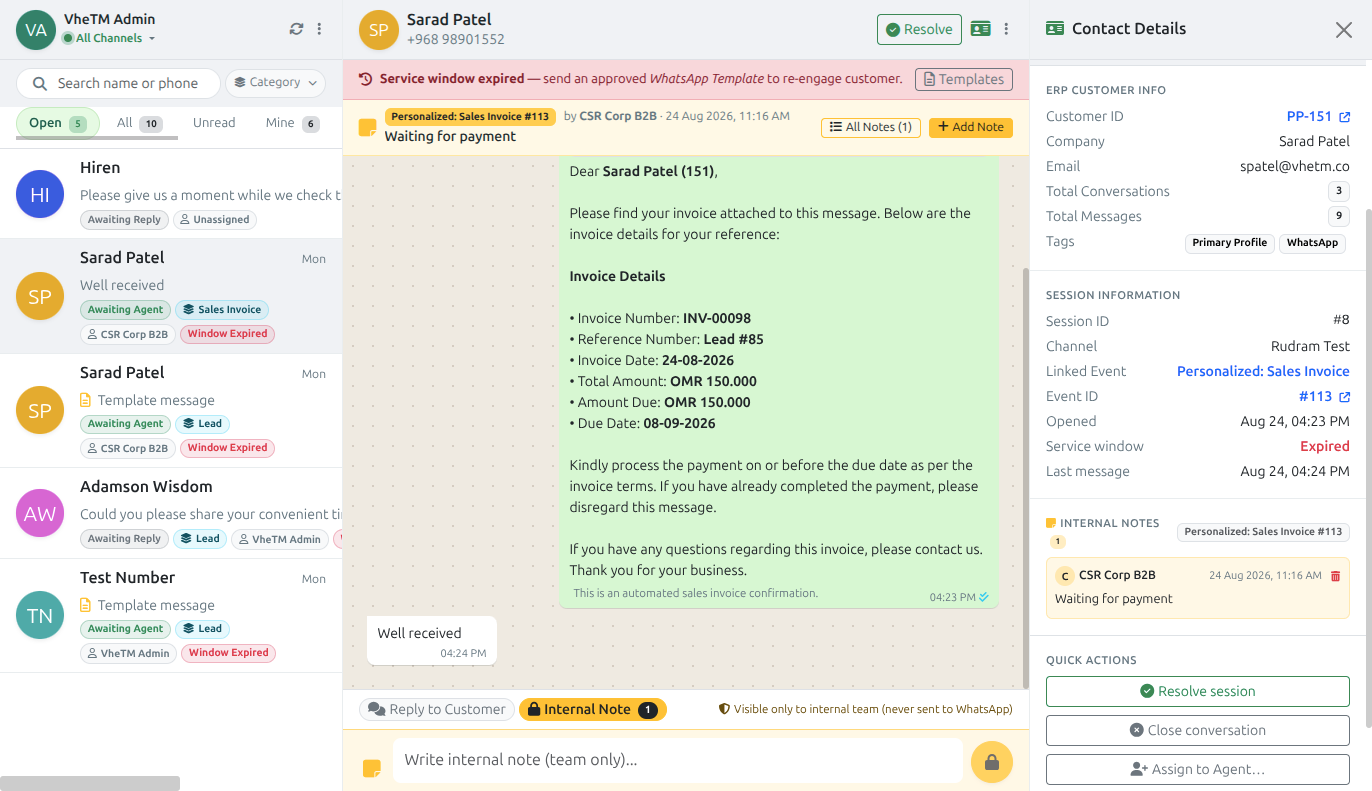
Internal team notes highlighted in yellow within the WhatsApp Agent Desk conversation stream
24-Hour Service Window Compliance & Dynamic Templates
Operating an official WhatsApp Business channel demands adherence to Meta's 24-hour customer-service window. VheTM provides transparent countdown timers and automatically guides agents to approved dynamic templates whenever initiating outbound contact outside the open window.
- Live countdown timer shows exact hours and minutes remaining in the 24-hour service window.
- Guided template picker prevents delivery failures by offering approved institutional formats.
- Dynamic media templates support sending PDF course brochures, fee receipts, and invoices with dynamic ERP values.
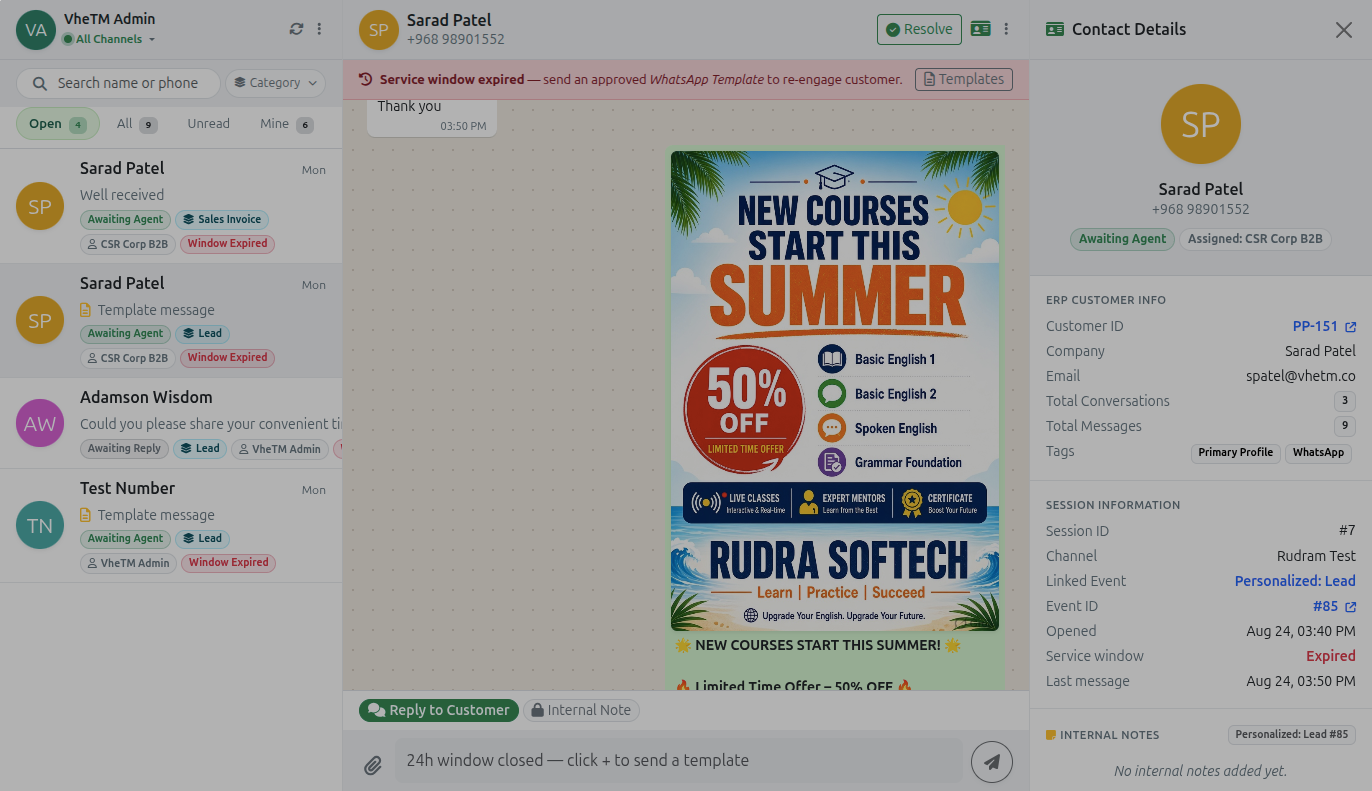
Customer service window expiration view with remaining time indicator and template guidance
How It Works: End-to-End Workflow
A unified 4-step execution model connecting ERP records with live WhatsApp sessions.
Open a Supported ERP Record
Start from a Lead, Sales Invoice, Customer or Account, Student or Trainee profile, or another supported record.
Choose an Approved Template
Select the appropriate template and review the supported ERP values prepared for the message.
Continue in the Agent Desk
Manage the connected conversation with customer context, quick replies, attachments and internal notes available to the team.
Assign, Resolve or Hand Over
Route the conversation to the responsible agent or department, record follow-up context, then resolve or close it when complete.
Real-World Operational Use Cases
How training institutes, colleges, and corporate L&D teams leverage the integration.
Admissions & Inquiries
Admissions & Counseling TeamsProspective students inquiring on WhatsApp are instantly linked to CRM Leads. Counselors review course interests, dispatch official prospectus PDFs via approved templates, and log follow-up notes as students advance toward enrollment.
Tuition & Fee Collection
Finance & Accounts TeamsFinance officers trigger payment reminders directly from Sales Invoices with dynamic amounts and due dates. Trainees share payment receipts in chat; accountants verify the receipt and leave an internal note without switching software.
Batch Schedules & Alerts
Academic CoordinatorsSend batch launch dates, timetable revisions, and daily attendance notices directly to learners' WhatsApp from their Trainee profiles, generating dramatically higher response rates than legacy email or SMS.
Multi-Department Handover
Operations & Support TeamsWhen a student has a question spanning multiple departments—such as fee clearance for exam certification—the agent adds an internal briefing note and reassigns the ticket to Examination or Accounts with zero context loss.
Personal Phone WhatsApp vs. VheTM Connected Agent Desk
Why institutional leadership is replacing disconnected personal devices with official ERP integration.
| Operational Dimension | Personal WhatsApp on Staff Phones | VheTM Connected Agent Desk |
|---|---|---|
| Channel Ownership | × Fragmented across employees' personal phones and private SIM cards | ✓ Official verified institutional WhatsApp Business channel centrally controlled |
| ERP & Record Context | × Zero ERP connection; agents repeatedly ask students for IDs, courses & invoices | ✓ Live context panel displays CRM Leads, invoices, course batches & profile data |
| Audit Trail & Retention | × Chat history vanishes when employees resign or phones are misplaced | ✓ All messages, documents, and notes permanently archived in the institutional ERP history |
| Team Collaboration | × Messy message forwarding and manual screenshots across staff phones | ✓ Multi-agent console, role-based assignment, department handover & private internal notes |
| Messaging Speed & Accuracy | × Manual typing prone to errors, typos, and outdated course fee quotations | ✓ 1-click ERP triggers, pre-approved templates, and / quick replies with dynamic variables |
| Policy & Compliance | × High risk of policy breaches, unmonitored messaging, and account bans | ✓ Transparent 24h window countdown timer and Meta-compliant template enforcement |
What the Release Adds
A connected WhatsApp workflow for the teams and records involved in everyday operations.
One communication trail across ERP records
Link supported WhatsApp sessions directly with the business record that gives the conversation meaning.
- CRM Leads, Sales Invoices, Student or Trainee Profiles and Customer or Account records can provide the session context.
- Conversation history, shared documents and agent responses stay available for future reference.
- Agents can continue contextual follow-up without moving between unrelated ERP screens.
Faster conversations with the right controls
Give agents a productive shared workspace while keeping templates and communication rules visible.
- Initiate messaging from a supported record with approved templates and supported dynamic ERP values.
- Use / commands for centrally managed quick replies, categories, autocomplete and keyboard navigation.
- Review customer-service window status and template guidance when normal service messaging is unavailable.
Collaborate without losing context
Keep ownership and internal coordination visible as a customer moves between teams.
- Assign or transfer sessions to the appropriate agent, team or department.
- Use Internal Note mode for team-only follow-up, billing, support and handover instructions.
- Resolve or close completed conversations while retaining the relevant history.
Why It Matters for Institutional Leadership
Streamlining team communication while safeguarding enterprise institutional knowledge.
Teams can respond with the customer and business context already in view, while maintaining a consistent, traceable communication process. The release reduces repeated lookup and manual message preparation, makes team handover clearer, and keeps WhatsApp communication connected to the broader CRM, billing, learner and operational workflows.
How to Get Started in VheTM
Use the supported record-level action or open the WhatsApp Agent Desk from the ERP navigation.
From a supported record, choose Send WhatsApp and select the approved template that suits the communication.
Review the supported data prepared from the current ERP record, then send the message and continue the session in the Agent Desk when required.
In the Agent Desk, review context, use quick replies or media, add internal notes and assign or hand over the conversation as needed.
Use the conversation list and connected record history to review previous communication and outstanding follow-up.
Release Interface Gallery
Verified screenshots of WhatsApp Agent Desk & Connected ERP Integration in active operation.
Unified Agent Desk console with live CRM Lead contextual side-panel
Searchable / quick reply shortcut menu with categorized auto-completion
Confidential internal team notes inserted directly into the conversation stream
24-hour customer-service window countdown timer and approved template selector
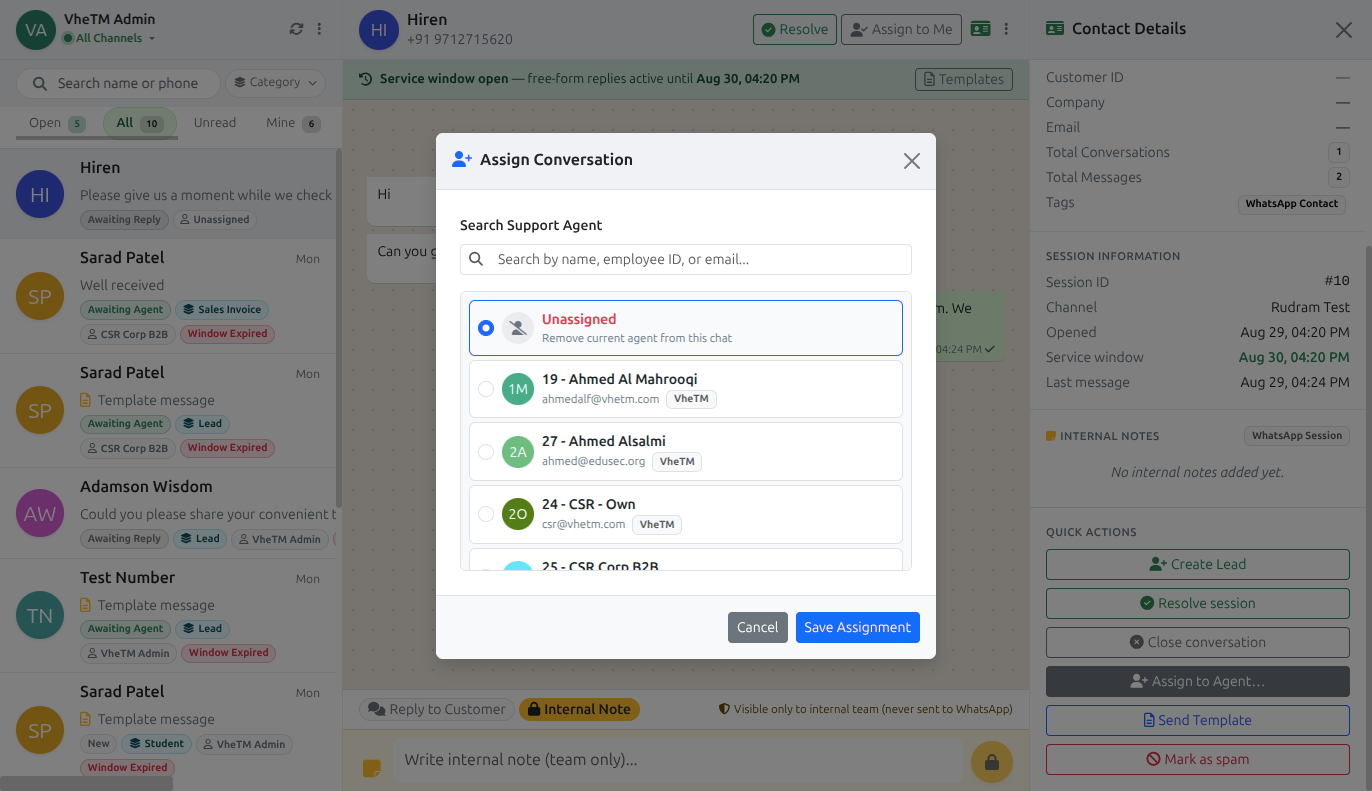
Multi-agent routing, counselor assignment, and department handover dialog
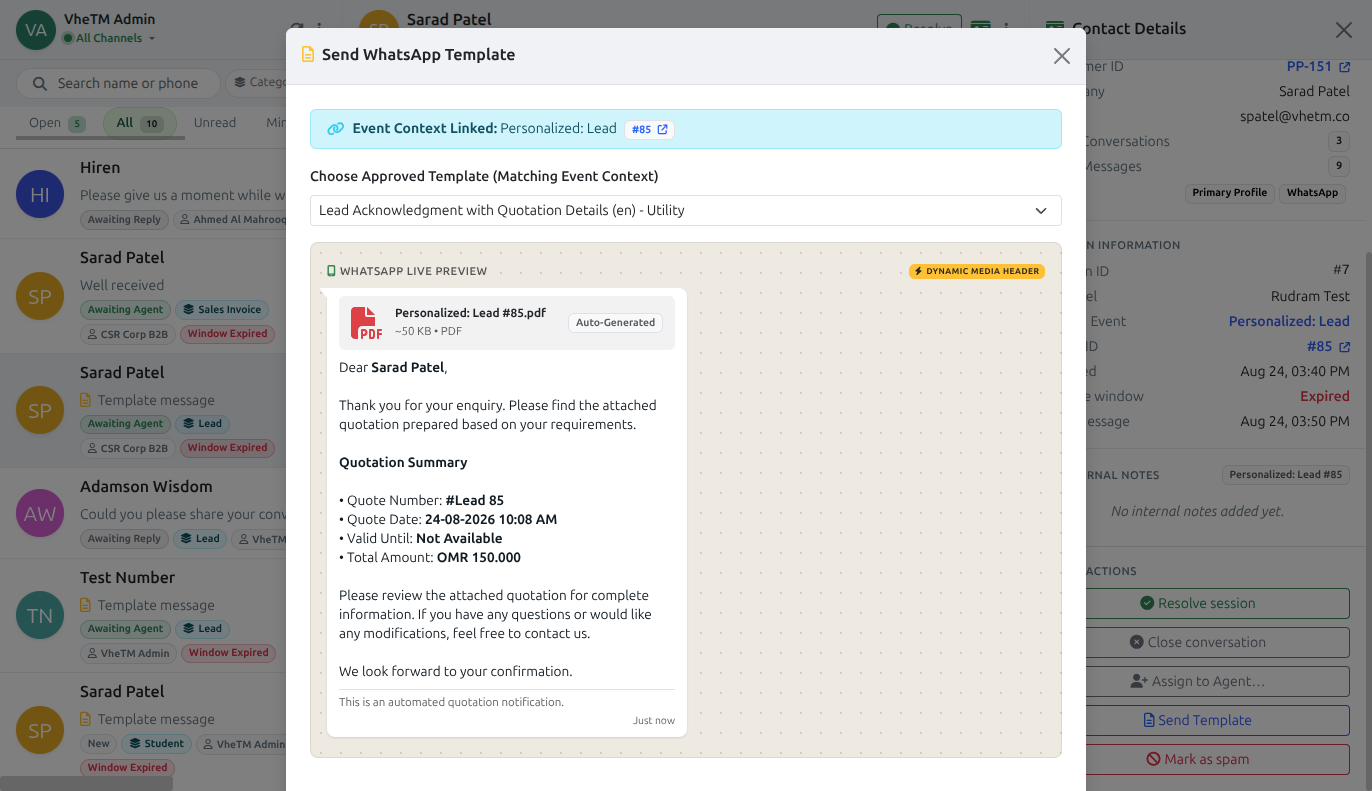
Dynamic media template configuration with ERP variable placeholders
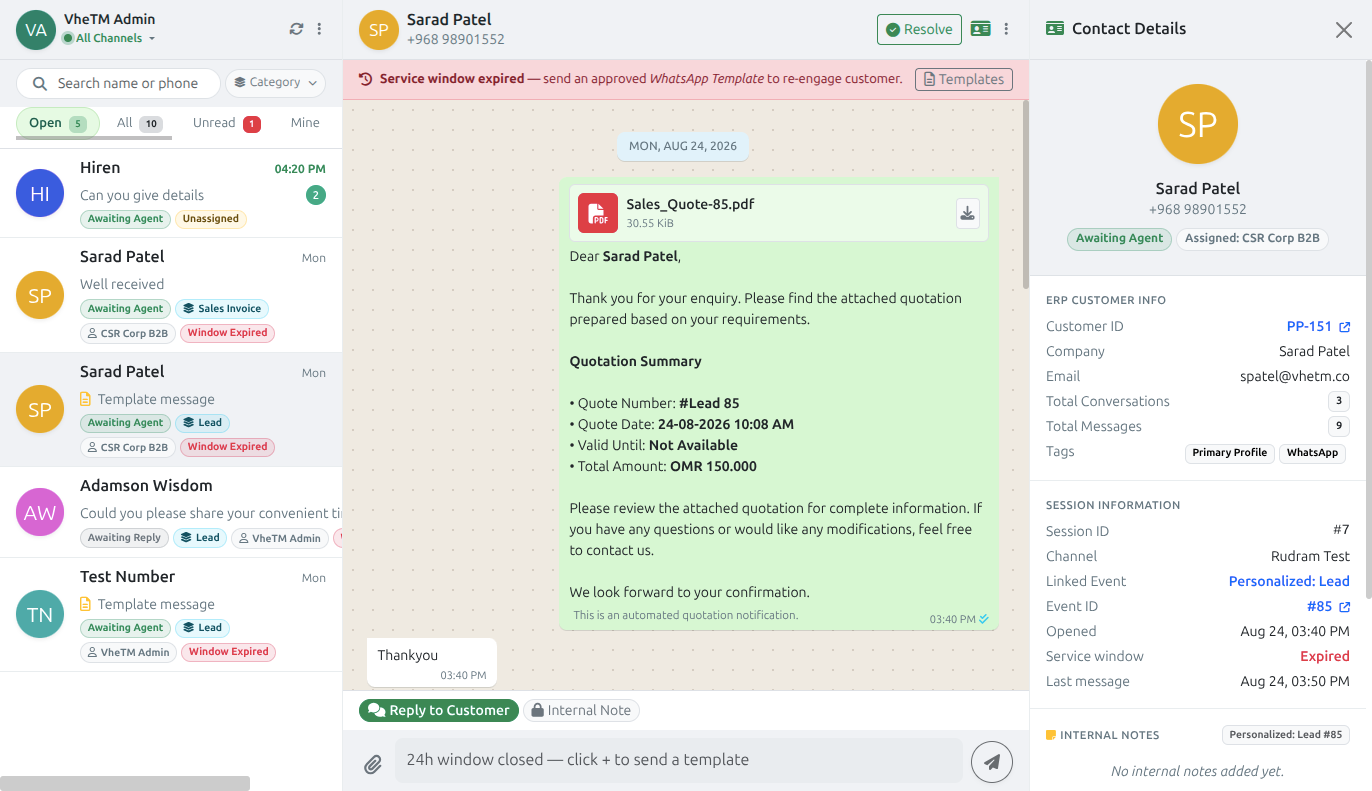
Centralized multi-agent inbox with unread badges and resolution filtering
Frequently Asked Questions
Common operational and technical questions regarding the WhatsApp integration.
WhatsApp conversations can be associated with CRM Leads, Sales Invoices, Student or Trainee Profiles, or Customer Accounts. When linked, the live context panel appears in the Agent Desk, and the entire conversation history, shared documents, and internal notes remain permanently attached to that ERP record.
Yes. VheTM connects to official WhatsApp Business channels, allowing multiple authorized agents across Admissions, Accounts, Support, and Academics to collaborate from a centralized multi-agent console with role-based routing.
The Agent Desk displays a live countdown timer showing the remaining time in the customer-service window. When the window expires, the system guides agents to select approved dynamic templates with supported ERP placeholders, ensuring 100% compliance with WhatsApp Business Platform policies without risk of account suspension.
Internal Notes are highlighted yellow within the conversation interface and are strictly for ERP team members. Customers never see internal notes; they are used for briefing teammates, recording fee follow-up discussions, and handover instructions.
The Agent Desk supports sending and receiving supported images, PDF course brochures, fee receipts, invoices, documents, and audio files, complete with caption previews and ERP association.
Share This Release With Your Network
Help other training directors, academic coordinators, and campus administrators discover the latest capabilities in VheTM.
Communication & Notifications
Explore the complete omnichannel communication suite.
Explore FeatureHow VheTM Manages Training Attendance
See how automated absence WhatsApp triggers work with daily registers.
Read GuideEducation & Training Institutes
Discover how VheTM powers full lifecycle education and training management.
View Solution