Complete Training Enrollment &
Registration Software
Streamline private student registration, handle corporate customer portal candidate nominations, enforce batch capacity limits, and connect bookings directly to sales invoices.
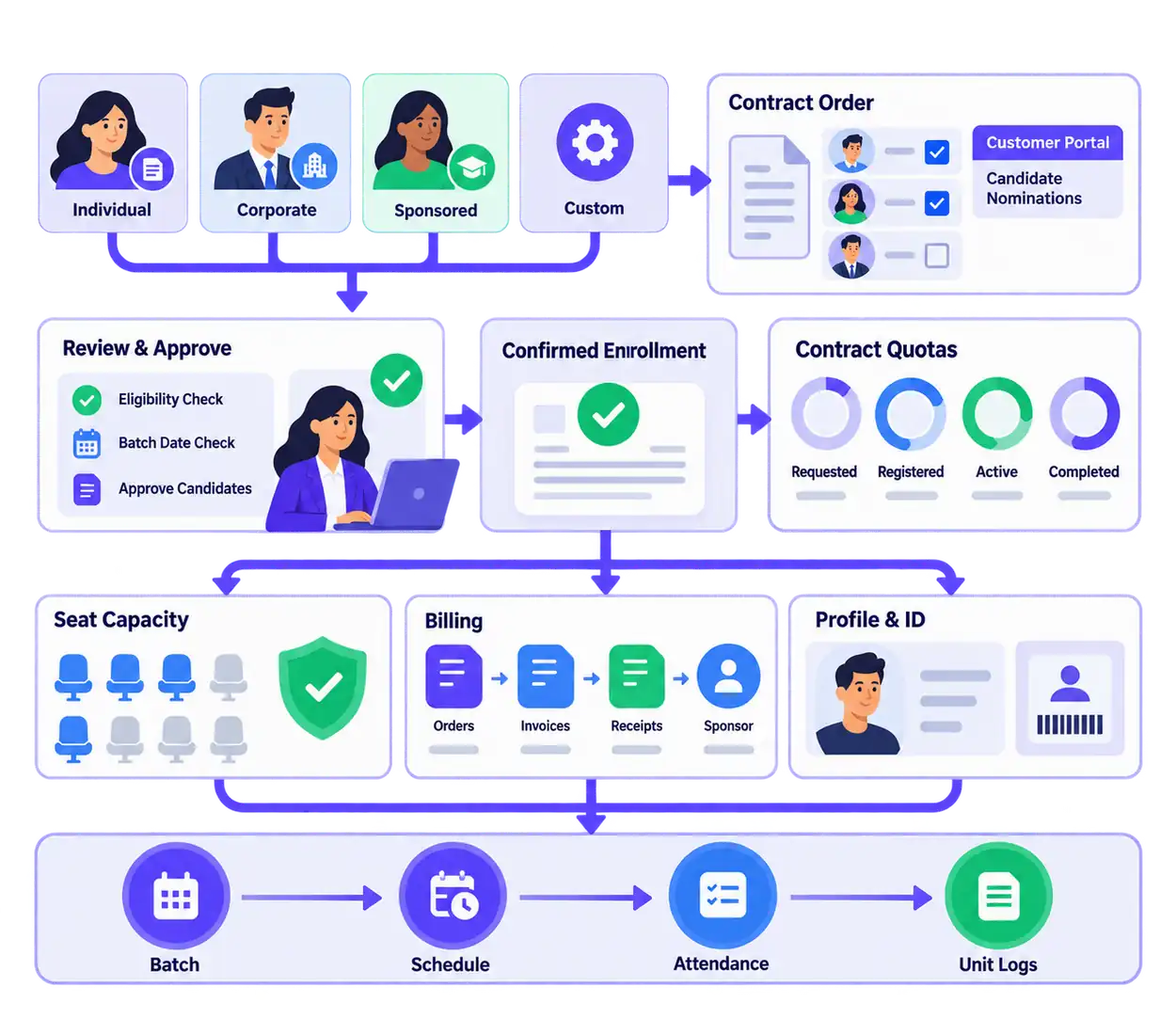
From Inquiries and Corporate Requests to Confirmed Batch Seats
Managing trainee intake through email attachments and disjointed spreadsheets creates administrative chaos. Coordinators lose track of corporate contract quotas, accidentally overbook limited classroom seats, and manually re-type student details into billing software.
VheTM unifies the complete enrollment lifecycle. Whether handling individual walk-in leads, sponsored candidates, or multi-seat corporate contracts through the Customer Portal, registrations connect directly with batch timetables, seat capacities, sales invoices, and 360° student profiles.
Corporate Portal Requests
Corporate clients nominate employee candidate lists directly against contracted training orders.
One-Click Conversion
Review candidate requests and convert approved nominations into confirmed batch registrations.
Capacity Enforcement
Enforce classroom seat limits and prevent overbooking across concurrent training batches.
Linked Sales Orders
Connect every registration to corporate billing accounts, tuition invoices, and payment receipts.
Everything You Need to Manage Training Enrollment
Explore the verified capabilities built into VheTM for managing private leads, corporate candidate nominations, and batch rosters.
4 Distinct Intake Streams
Manage Individual (private pay), Corporate (contract quotas), Sponsored (employer affiliation), and Custom registration workflows.
Self-Service Customer Portal
Corporate clients log into the self-service portal to submit employee candidate nominations directly against their contracted batch quotas without email friction.
Candidate Request Review
Coordinators review submitted candidate lists, verify batch dates and eligibility, and convert approved nominations into confirmed batch registrations in one click.
Contract Quota Tracking
Track requested candidates, registered candidates, active learners, and completed trainees directly against corporate purchase agreements and invoices.
Batch Seat Capacity Control
Define maximum seat capacity per cohort based on room size, track available seats in real time, and prevent overbooking across intake batches.
Linked Invoices & Student ID
Automatically provision 360° student records upon enrollment confirmation, link to tuition invoices, and issue student identification cards.
How Training Enrollment Operates in VheTM
From initial candidate nomination to seat allocation and schedule handoff, follow the complete intake workflow.
Candidate Nomination
Private leads or corporate clients submit candidate lists through the self-service portal against contracted quotas.
Review & Capacity Check
Coordinators inspect submitted nominations, verify batch dates, and validate classroom seat availability.
Enrollment Approval
Approve candidates to convert nominations into confirmed batch registrations and provision 360° trainee profiles.
Financial Reconciliation
Link registrations to sales orders, generate individual tuition invoices or corporate client contract statements.
Schedule & Attendance
Automatically populate batch session rosters for daily attendance marking and syllabus unit delivery tracking.
Corporate Trainee Nomination & Approval Queue
See how administrators review candidate requests, allocate batch seats, and manage corporate contract quotas.
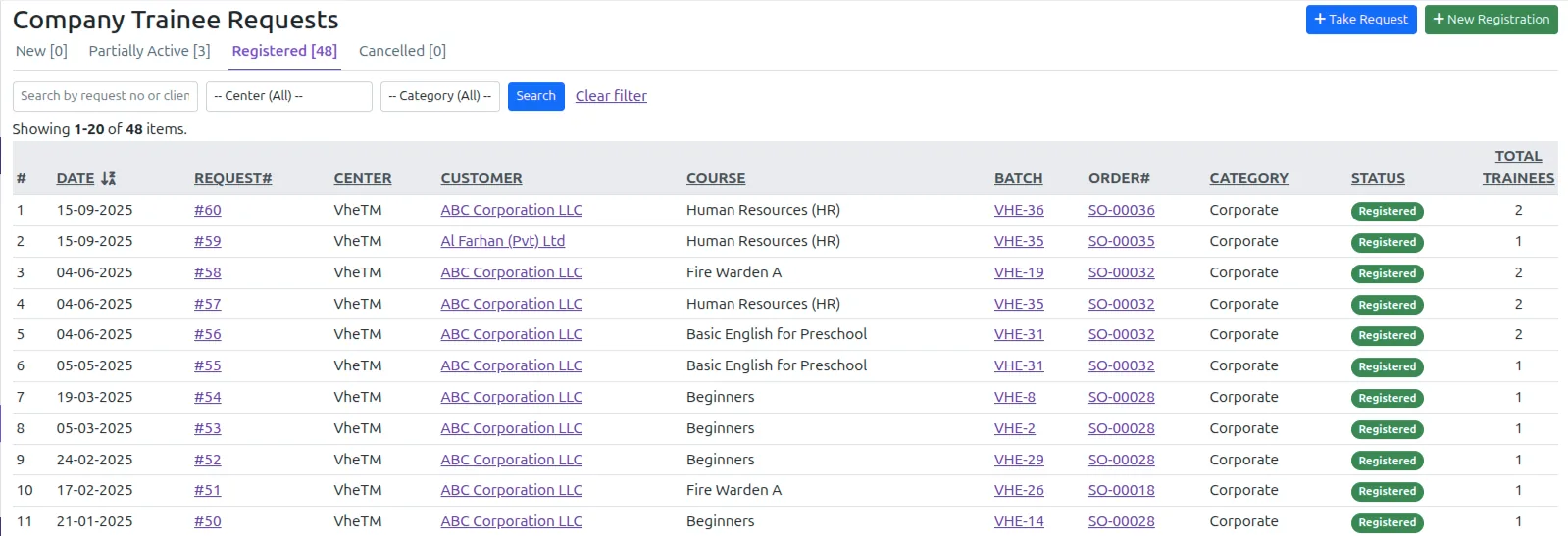
Streamlined Candidate Review & Batch Allocation
Eliminate messy spreadsheet emails from client HR departments. The Corporate Trainee Request queue centralizes all employee nominations, allowing coordinators to review submissions, verify batch seat availability, and approve registrations in seconds.
Why Training Organizations Choose VheTM
Engineered specifically for the real-world operational challenges of managing private student intake and corporate contracts.
Zero Email Friction
Corporate clients submit employee candidate lists through the self-service portal, eliminating manual email re-typing.
Strict Capacity Limits
Enforce classroom seat limits and prevent overbooking across concurrent training batches and intake cohorts.
Contract Quota Control
Track requested, active, and completed trainees directly against corporate purchase agreements and invoices.
Instant Handoff
Confirmed registrations immediately populate batch timetables, session rosters, and attendance ledgers.
Tailored for Real-World Registration Workflows
Explore how different training organizations use VheTM to manage private enrollments and corporate contract quotas.
Commercial Training Institutes
Manage private student registrations, generate individual tuition sales invoices, enforce seat capacity, and issue student ID credentials.
- Private lead conversion & billing
- Classroom seat capacity monitoring
Corporate Workforce Contracts
Contract for employer-sponsored training quotas (e.g. 200 staff), collect candidate lists via the customer portal, and track contract fulfillment.
- Customer Portal candidate nominations
- Corporate master order deduction
Skill & Vocational Academies
Register sponsored and government-subsidized trainees, verify eligibility criteria, allocate lab seats, and track multi-month cohort progress.
- Sponsored trainee relationship tracking
- Multi-session cohort placement
Move Beyond Spreadsheets and Disconnected Forms
See how VheTM’s connected training operations ERP transforms enrollment and registration.
| Operational Capability | Disconnected Spreadsheets | VheTM Enrollment ERP |
|---|---|---|
| Corporate Candidate Intake | Manual copy-pasting from employer email attachments | Self-service candidate requests via Customer Portal |
| Contract Quota Tracking | Separate spreadsheet with no link to active registrations | Live quota tracking against master corporate sales orders |
| Batch Seat Capacity | Accidental overbooking requiring emergency room changes | Automated seat capacity enforcement preventing over-enrollment |
| Student Profile Provisioning | Manual data re-entry into student databases | Automatic 360° profile creation with linked lifetime ID |
| Attendance Handoff | Paper rosters printed and manually updated days later | Immediate handoff to batch schedule attendance ledgers |
Part of the Unified VheTM Platform
Enrollment & Registration is deeply connected with CRM lead generation, WhatsApp messaging, financial accounting, and Reports Plus dynamic analytics within a single relational database.
Common Questions About Enrollment & Registration
Clear answers about corporate candidate portals, lead intake streams, batch capacity limits, and linked invoices.
Corporate customers access the secure VheTM Customer Portal where they select their active training contract and submit employee candidate lists directly against their allocated training quota. Training coordinators review and convert submissions into confirmed batch enrollments in one click.
VheTM supports four documented intake streams: Individual/Private leads (trainee pays tuition directly), Corporate leads (company contracts for multiple employee seats), Sponsored leads (company affiliated with trainee payment responsibility), and Custom leads for specialized institutional programs.
When creating batch cohorts, administrators define maximum seat capacity based on classroom size or program limits. During individual intake or corporate candidate approval, the system enforces capacity limits and prevents registrations from exceeding available room quotas.
Upon enrollment confirmation, VheTM automatically generates a 360° trainee profile (or connects to an existing student ID) and links the registration to sales orders, tuition invoices, payment receipts, and corporate sponsor billing records.
Take Control of Your Training Enrollment and Candidate Intake
See how VheTM helps training providers eliminate spreadsheet friction, streamline corporate nominations, and enforce batch capacity limits.