Complete Training Scheduling &
Resource Management Software
Coordinate multi-session batch timetables, instructor assignments, classroom seat capacities, and equipment assets with an automated holiday-aware scheduling engine.
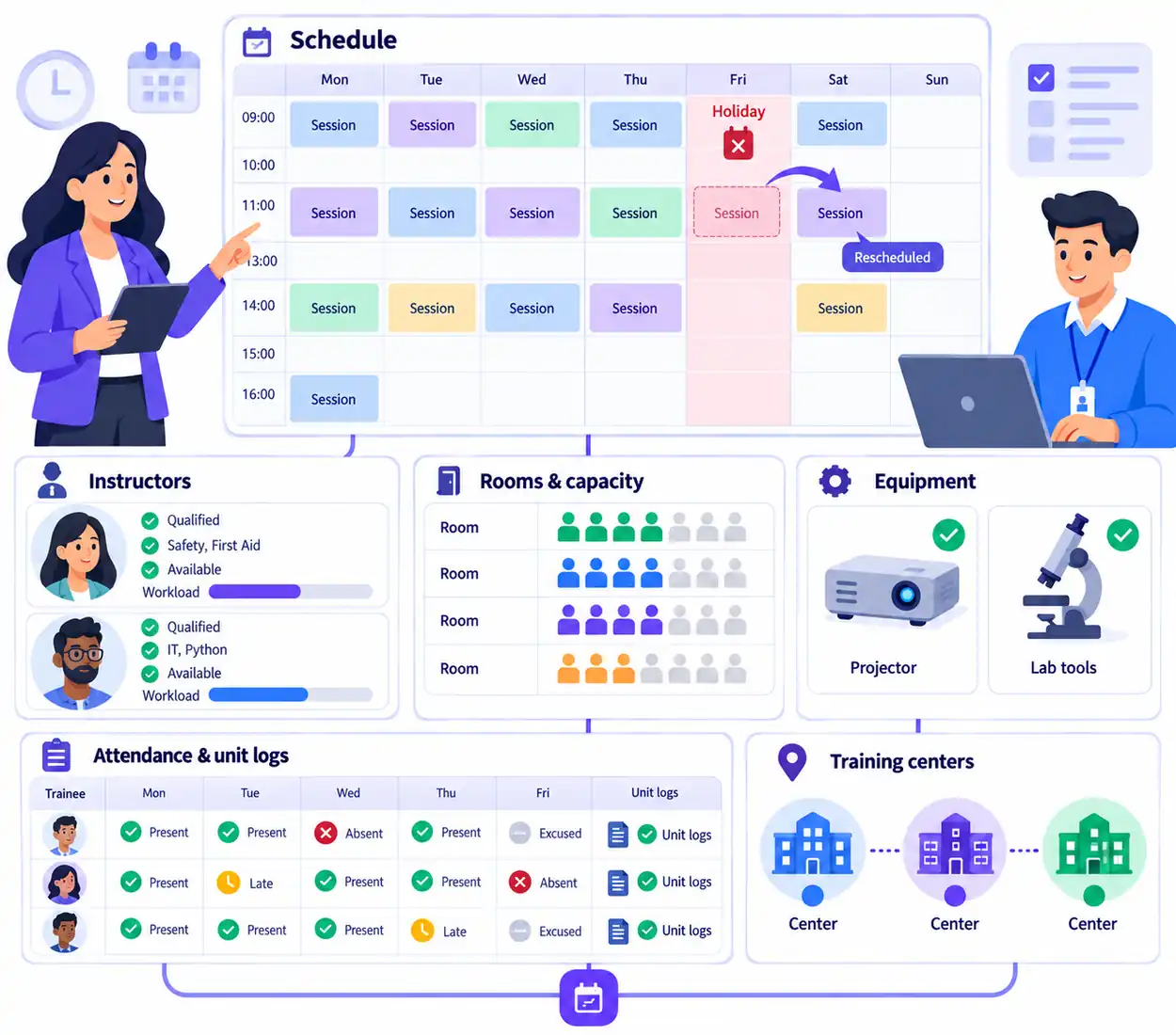
Coordinate Dates, Instructors, Rooms, and Equipment in One Place
Training schedules involve far more than picking a date. Coordinators must align course syllabi, instructor availability, classroom seating limits, specialized equipment assets, and regional holiday calendars across multiple branch locations.
VheTM provides a unified scheduling engine that connects session timetables directly with course units, student rosters, instructor workloads, and attendance ledgers. When public holidays or center closures occur, the system automatically shifts affected session dates forward without manual recalculation.
Multi-Session Timetables
Structure daily, weekly, or weekend session schedules with precise start and end times.
Holiday Conflict Shift
Entity-level and center holiday calendars automatically recalculate cohort dates forward.
Classroom Capacity
Assign rooms, prevent double-bookings, and monitor seat occupancy against student rosters.
Equipment Asset Tracking
Allocate lab tools, audiovisual equipment, and training resources to scheduled sessions.
Everything You Need to Manage Training Schedules & Resources
Explore the verified capabilities built into VheTM for managing session timetables, instructor assignments, and physical training assets.
Multi-Session Timetables
Create multi-session cohort schedules with start/end dates, session times, classroom locations, and instructor assignments per lecture unit.
Holiday Conflict Engine
Entity and center holiday calendars automatically shift affected session dates forward during running batches, eliminating manual calendar adjustments.
Instructor Assignment & Workload
Map certified instructors to course subjects, verify teaching availability across branches, and view instructor workloads to avoid double-bookings.
Classroom & Facility Capacity
Allocate training rooms, enforce seat capacity limits, monitor occupancy rates across campuses, and prevent room scheduling conflicts.
Equipment Asset Allocation
Track specialized training resources, lab equipment, audiovisual gear, and course materials assigned to specific scheduled sessions.
Attendance & Unit Logs
Instructors access one-click attendance recording directly from the session schedule to mark students Present, Absent, Late, or Excused.
How Training Scheduling Operates in VheTM
From initial batch timetable setup to room allocation and daily attendance execution, follow the end-to-end flow.
Timetable Creation
Select course and batch cohort, set recurring days, session duration, and overall program date ranges.
Holiday Conflict Check
System verifies entity and center holiday calendars, automatically shifting class dates across non-working days.
Room & Asset Allocation
Assign classrooms based on seat capacity and allocate required lab apparatus and equipment assets.
Instructor Assignment
Assign certified trainers to subject modules, verifying timetable availability across all branch centers.
Session Execution & Logs
Trainers execute sessions, log attendance per student, and record delivered syllabus units directly in the schedule.
Direct Session Execution & Attendance Tracking
See how scheduled training sessions connect directly to student rosters and instant attendance marking.
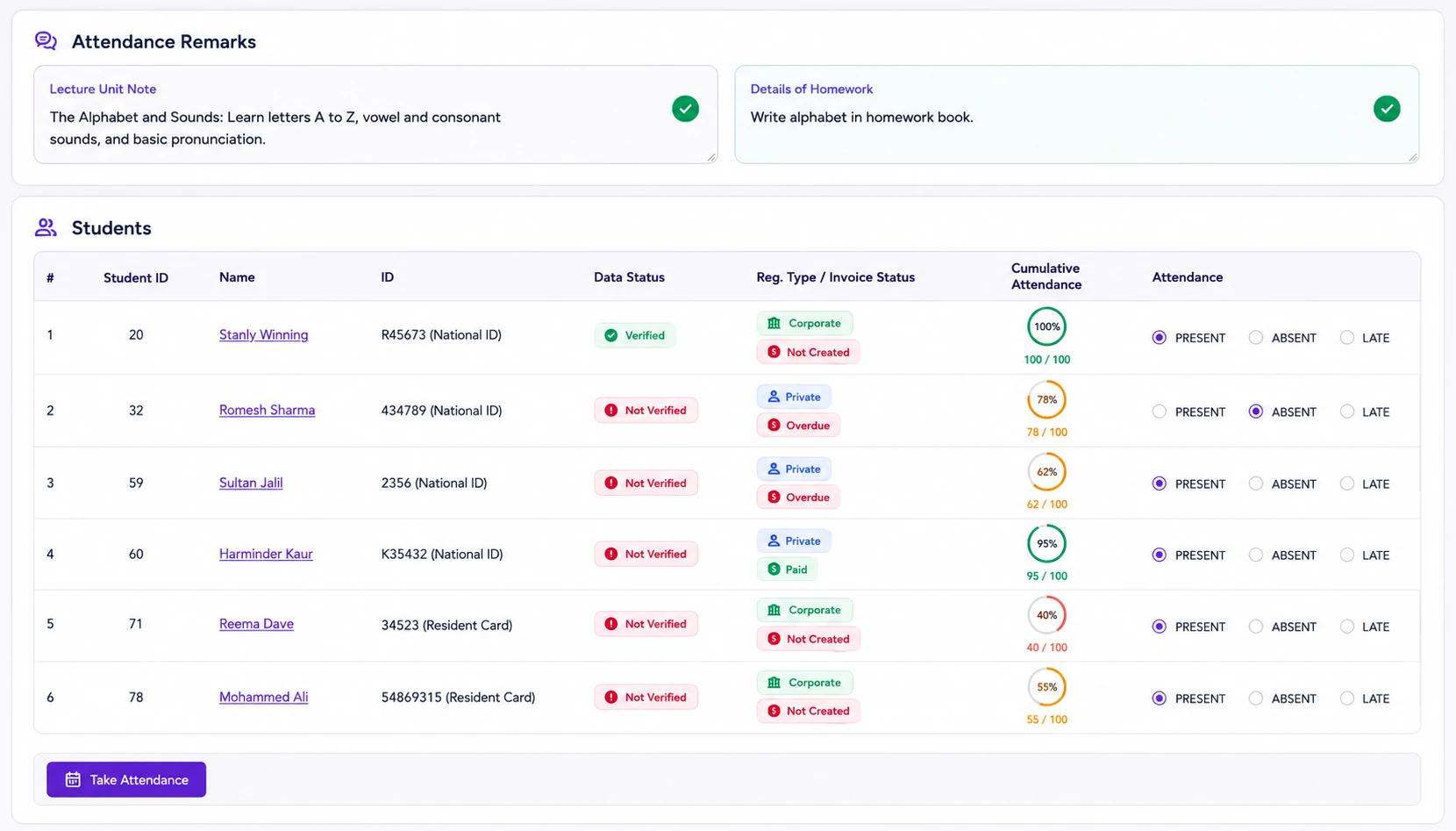
One-Click Session Attendance & Delivery
Eliminate paper sign-in sheets. From the batch schedule view, instructors launch session attendance with a single click, marking students Present, Absent, Late, or Excused while logging unit coverage.
Why Training Organizations Choose VheTM
Engineered specifically for the real-world operational challenges of managing multi-session schedules, instructors, and equipment.
Zero Holiday Conflicts
Public holidays and center closures automatically shift batch session dates forward without manual intervention.
Optimized Facilities
Prevent room double-bookings, optimize classroom seat capacity, and track equipment allocations.
Balanced Instructor Load
Assign qualified trainers based on course subject eligibility and monitor teaching hours across branches.
Multi-Center Scale
Coordinate concurrent training timetables across multiple campuses and cities from a central web ERP.
Tailored for Real-World Scheduling Workflows
Explore how different training organizations use VheTM to coordinate session timetables and physical resources.
Commercial Training Institutes
Manage high-volume public session calendars, schedule weekend and evening batches, allocate classrooms, and automate holiday shifts.
- Recurring multi-session daily timetables
- Classroom seat capacity monitoring
Corporate L&D Academies
Schedule dedicated corporate employee cohorts, allocate on-site training rooms, coordinate certified instructors, and track completion dates.
- Client contract batch scheduling
- Certified trainer workload mapping
Vocational & Technical Labs
Coordinate specialized lab workshops, assign technical apparatus and equipment assets, and track practical unit delivery logs.
- Equipment asset allocation
- Session syllabus unit delivery logs
Move Beyond Spreadsheets and Disconnected Calendars
See how VheTM’s connected training operations ERP transforms scheduling and resource management.
| Operational Capability | Disconnected Spreadsheets | VheTM Scheduling & Resource ERP |
|---|---|---|
| Holiday Conflict Shifts | Manual calendar math risking missed sessions or wrong dates | Automated holiday engine with date shift recalculation |
| Classroom Capacity | Room double-booking and manual capacity checks | Room assignment with seat capacity tracking and conflict checks |
| Equipment Asset Tracking | No link between session timetables and equipment assets | Allocate specialized training equipment and lab gear to sessions |
| Attendance Handoff | Paper sheets re-typed days later with missing data | One-click attendance recording directly from session entry |
| Audit & Change History | No record of who changed session dates or room assignments | Complete chronological audit timeline for every schedule revision |
Part of the Unified VheTM Platform
Scheduling & Resource Management is deeply connected with CRM lead generation, WhatsApp messaging, instructor payroll, and Reports Plus dynamic analytics within a single relational database.
Common Questions About Scheduling & Resources
Clear answers about multi-session batch timetables, holiday recalculation, classroom capacities, and equipment tracking.
VheTM supports multi-session batch scheduling where coordinators configure recurring daily, weekly, or custom session timetables with specific start/end dates, start/end times, instructor assignments, and room allocations.
VheTM includes a holiday-aware scheduling engine. When entity-level public holidays or local center closures are added or modified, the system automatically detects affected batch sessions and recalculates subsequent class dates forward without double-booking rooms or instructors.
Yes. VheTM allows training coordinators to assign specific classrooms with seat capacity limits and track generalized equipment assets (such as projectors, lab apparatus, and teaching tools) allocated to scheduled sessions.
Every scheduled session links directly to the student roster for that batch. Instructors mark session attendance (Present, Absent, Late, Excused) and record syllabus unit delivery logs with one click from the schedule view.
Take Control of Your Training Schedules and Resources
See how VheTM helps training providers eliminate timetable conflicts, optimize classroom capacities, and deliver automated holiday-aware schedules.